

Time Off Requests allow managers to review, track, and manage employee leave submissions efficiently. Processing these requests promptly ensures team coverage and maintains accurate attendance logs.
To approve or reject time off requests as a manager
- Open the Stafiqo portal and log in to your account.
- In the left navigation menu, click on Notification (or navigate to Time off under the Personal menu).
- Select the Time off Requests tab to view pending submissions.
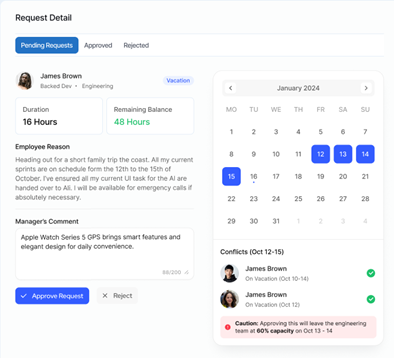
- Click on a specific request card to view full Request Detail, including duration, remaining balance, employee reason, and team schedule conflicts.
- Evaluate potential coverage issues using the schedule overlay or caution indicators.
- (Optional) Enter feedback or reason in the Manager’s Comment box.
- Click Approve Request to grant the leave, or click Reject to decline the request.
Note: Approving a request automatically updates the employee’s time-off balance and schedule across the platform.