

Managing and updating attendance entries ensures accurate tracking of employee working hours, logged time, paid hours, and overtime across your organization.
To review and manually edit employee attendance records
- Log in to your Stafiqo account.
- In the main navigation menu on the left side of the dashboard, click on Attendance.
- Select Employee Attendance (or My Attendance depending on whether you are managing team records or reviewing your own).
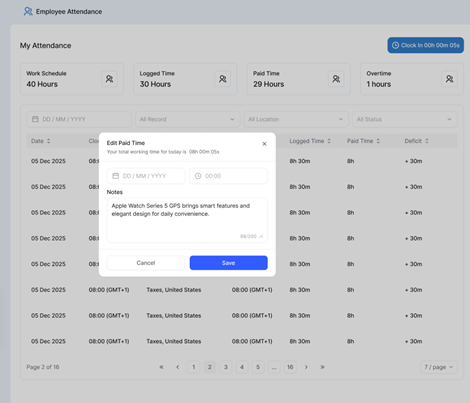
- Use the filter options at the top (such as Date Range, Location, or Status) to locate the specific record you wish to review.
- Locate the employee record in the attendance list and click on the specific record or action field you want to modify (such as Logged Time, Paid Time, or Clock In / Clock Out times).
- In the edit modal that appears (e.g., Edit Paid Time), adjust the time and date fields to the correct values.
- Add any required explanatory notes or details regarding the manual adjustment in the Notes box.
- Click Save (or Update) to confirm and apply the changes to the attendance record.
If you have any questions or need further assistance, please contact our support team.