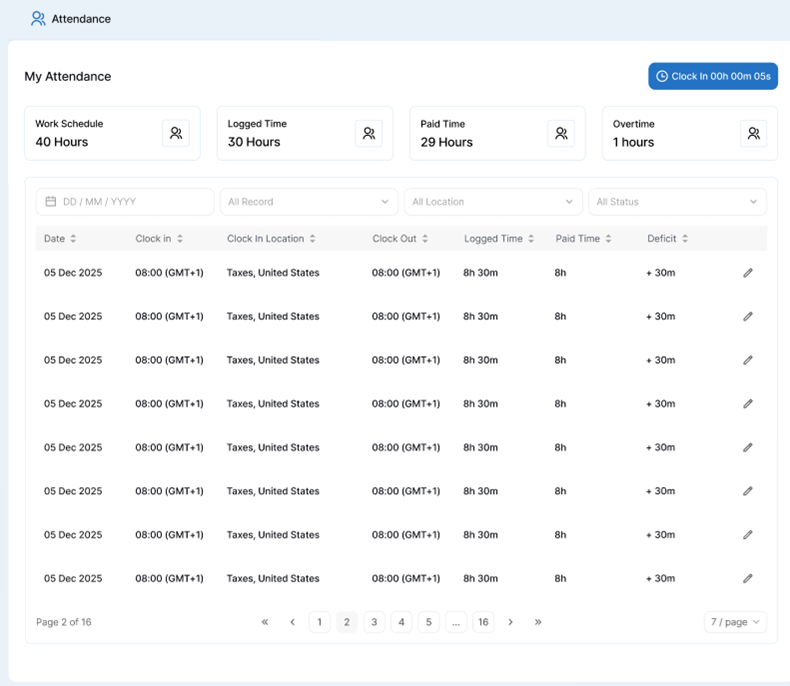
The Attendance section provides a detailed view of your tracked time, approved paid hours, and calculated overtime. This tool helps you review your daily work records, monitor deficit time, and ensure your logged hours align with your scheduled work hours.
To view your logged hours, paid time, and calculated overtime
Navigate to the Attendance section from the main sidebar menu on the left.
Select My Attendance from the top tab navigation.
Review the summary overview cards at the top of the page to see your aggregated hours:
- Work Schedule: Displays your expected total working hours for the period (e.g., 40 Hours).
- Logged Time: Displays the actual total hours you recorded (e.g., 30 Hours).
- Paid Time: Displays the approved paid hours (e.g., 29 Hours).
- Overtime: Displays the total calculated overtime hours earned (e.g., 1 Hour).
Use the date and filter controls below the summary cards to refine your record view:
- Select a specific date range using the date picker (DD/MM/YYYY).
- Filter by record type (All Record), location (All Location), or approval status (All Status).
Examine the detailed daily breakdown table to review individual records:
- Date: View the specific date of the entry.
- Clock In / Clock Out: View your exact start and end timestamps along with time zones and locations.
- Logged Time: Check the duration recorded between clock-in and clock-out.
- Paid Time: See the total approved paid duration for that day.