Skip to content
Staffiqo

Getting Started

4
  • Adding a new employee profile and inputting basic information.
  • Viewing Your Personal Calendar and Scheduled Meetings
  • How to Review Upcoming Holidays, Birthdays, and Work Anniversaries
  • test

Company Setup

5
  • Configuring Role-Based Access and Module Permissions for Different Administrators
  • Creating and Categorizing New Job Titles
  • Adding and managing global company office locations.
  • Configuring general payroll settings, time zones, and pay periods
  • zdsgdfsga

Employee Management

12
  • Configuring Role-Based Access and Module Permissions for Different Administrators
  • Creating and Categorizing New Job Titles
  • Setting Up Pay Types (Fixed Salary, Hourly, and Project-Based)
  • Configuring general payroll settings, time zones, and pay periods
  • Starting and managing the regular monthly payroll cycle.
  • Approving or rejecting time off requests as a manager.
  • Submitting a new time off request for vacation or sick leave.
  • Creating and configuring task lists for new hire onboarding.
  • Updating Emergency Contact Details and Employee Address Information
  • Assigning Departments, Job Titles, and Reporting Managers to Staff
  • Reviewing the active and inactive employee overview charts.
  • Setting up employee compensation, pay rates, and schedules

Attendance

4
  • Monitoring Attendance Deficits and Tracking Approved Overtime Statuses
  • Reviewing and manually editing employee attendance records.
  • Viewing your logged hours, paid time, and calculated overtime.
  • Clocking in and out of your work shift directly from the dashboard.
View Categories
  • Home
  • Docs
  • Employee Management
  • Updating Emergency Contact Details and Employee Address Information

Updating Emergency Contact Details and Employee Address Information

monir
Updated on August 23, 2026

< 1 min read

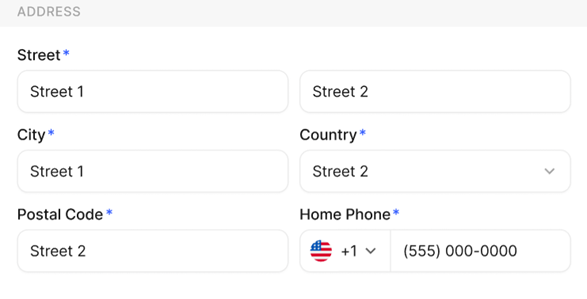
This action allows employees to keep their personal address and emergency contact details updated within the system to ensure accurate records and critical communication during emergencies.

To update emergency contact details and employee address information

  • Navigate to your Profile or personal details section from the left navigation panel in Stafiqo.
  • Select the Personal or Profile tab to view your current personal information.
  • Locate the Address or Emergency Contact section within your profile details.
  • Click the Edit button (or edit icon) next to the section you wish to update.
  • Enter or update your current address information (Street, City, State, ZIP/Postal Code, Country) or emergency contact details (Name, Relationship, Phone Number, Email).
  • Review all entered information to ensure accuracy.
  • Click Save or Update to apply the changes.
Creating and configuring task lists for new hire onboarding.Assigning Departments, Job Titles, and Reporting Managers to Staff

Powered by BetterDocs

Leave a Reply Cancel reply

Your email address will not be published. Required fields are marked *

Share This Article :

  • Facebook
  • X
  • LinkedIn
  • Pinterest

Was it helpful ?

  • Happy
  • Normal
  • Sad
Staffiqo

All rights reserved