

Employee compensation and schedule configurations allow administrators to establish accurate pay rates, define pay frequencies, assign overtime policies, and enforce standard work schedules across the organization.
To set up employee compensation, pay rates, and schedules
- Log in to your Staffiqo account.
- In the main navigation menu on the left, click on Employee and select the employee profile you wish to configure.
- Navigate to the Job or Compensation tab within the employee’s detail view.
- Click on Pay Information or Edit Compensation.
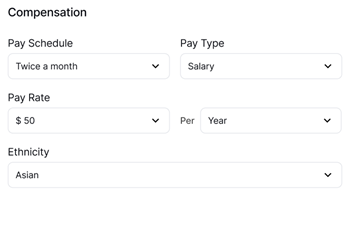
- Select the Pay Type (e.g., Salary, Hourly, or Commission).
- Enter the Pay Rate amount and set the corresponding pay frequency (e.g., Hourly, Weekly, Bi-weekly, Monthly).
- Assign the appropriate Pay Schedule and specify effective start dates for the pay rate.
- Configure Overtime Rules and standard work hour expectations if applicable to the employee’s role.
- Click Save to apply the compensation and schedule settings.
Note: Changes to pay rates and pay schedules will automatically update associated payroll calculations for future pay runs.